Unlock BOGO 50% Off: Your Guide to Dynamic Post-Add-to-Cart Upsells on Shopify
Hey there, fellow store owners! Your friendly Shopify migration expert here, diving into a really interesting discussion that popped up in the community recently. It's a common question, and one that highlights a specific nuance in setting up those enticing 'Buy One Get One 50% Off' (BOGO 50%) deals.
Our community member, DM_7, kicked things off, looking for an app that could do something very specific: a BOGO 50% off sale where, as soon as a customer adds any product to their cart, a popup appears. This popup would then ask if they'd like to buy that same exact product again at 50% off. Sounds simple enough, right? But as many of you (like lorenzo_store1, who chimed in saying they were in the same boat) know, getting that exact dynamic, post-add-to-cart popup can be a bit trickier than a standard BOGO.
The BOGO 50% Popup Puzzle: Why It's Not Always Straightforward
What DM_7 was describing isn't just a basic BOGO. As Moeed wisely pointed out, it's technically more of a post-add-to-cart upsell. Many traditional BOGO apps work at the cart or checkout level, applying a discount automatically, or requiring specific product bundles. But that immediate, triggered popup offering the same item again after adding to cart? That's where things get specific.
Chloe.paker echoed this, advising to ask app developers if they support a "dynamic 'same item again' offer." This means the app needs to be smart enough to identify the product just added and offer that specific product/variant again at a discount, rather than a pre-defined 'buy X, get Y' rule.
Native Shopify Discounts: A Good Start, But Lacking the Popup Punch
Before jumping to apps, it's always good to check Shopify's built-in capabilities. oscprofessional mentioned that you can set up a "Buy 2+ of the same product = 50% off second item" using Shopify's native discount functions (under Discounts → Create discount → Volume discount). It's free and works at checkout, which is great!
However, the catch is that it won't trigger that immediate, dynamic popup DM_7 was looking for. It's a fantastic solution if you're happy for the discount to simply apply in the cart or at checkout without the interactive prompt.
App Solutions for That Dynamic Post-Add-to-Cart Upsell
For that specific popup behavior, the community had some excellent recommendations. The key is finding an app that can "intercept" the add-to-cart action and present a relevant offer.
Top Contenders for Dynamic BOGO Popups:
- Candy Rack: This app came up multiple times. Lyn-Bui recommended it for its ability to trigger post-add-to-cart upsells and offer the same product with a percentage discount. TomJanu even confirmed, saying, "this is easily doable using the “Same product” offer." Moeed also highlighted it for that precise "intercept at that exact moment" behavior.
- BOGOS: Free Gift Bundle Upsell: Ellie-BOGOS (from the BOGOS team) jumped in with detailed instructions and screenshots, confirming their app supports this exact flow: "Customer adds a product to cart → a popup appears → they can choose to buy the same exact product again at 50% off." Chloe.paker also recommended BOGOS for its dynamic capabilities.
- Hura: Smart Discounts: oscprofessional mentioned Hura for supporting same-product BOGO with popups, specifically a cart popup when a product is added.
- Bold Product Options / Bold BOGO: Also suggested by oscprofessional for flexible BOGO rules, same-product offers, and popup support.
- iCart Cart Drawer Cart Upsell: Gimmesales recommended iCart, noting its support for cart upsells, BOGO-style offers, and displaying offers inside the cart drawer/popup.
- Rebuy (Premium): For those looking for a more advanced, powerful (and pricier) solution, Rebuy was mentioned by oscprofessional for its sophisticated cart experience and "buy again at 50% off" recommendations.
Setting Up Your Dynamic BOGO 50% Offer (Using BOGOS as an Example)
Let's look at how you might set this up using an app like BOGOS, based on the helpful advice from Ellie-BOGOS. This gives you a clear actionable path for achieving that specific popup goal:
- Install the App: First things first, install an app like BOGOS: Free Gift Bundle Upsell from the Shopify App Store.
- Create Your Offer: Within the app, you'll want to create a new gift offer. When prompted, select the "BOGO" template.
- Enable "Same Product" Logic: This is the crucial step for DM_7's specific need. Look for an option like "Gifts will be the same as selected products" and make sure to turn it on. This ensures that when any eligible product is added to the cart, the customer sees a popup offering that very same product again with the 50% discount. This allows for a bulk BOGO setup across multiple products without individual rules.

- Customize the Popup (Gift Slider): You'll then customize the "gift slider" (which is the popup) to display your desired message and branding. This is where you make it clear that the customer can get the same item at 50% off.
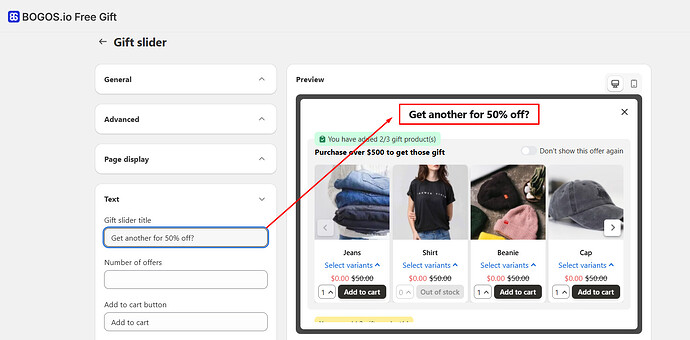


This approach, highlighted by Ellie-BOGOS, also handles "equal or lesser value" logic automatically if you're applying it across a collection, which is a huge time-saver.
The Expert Take: Are Popups Always the Best?
Now, this is where the community discussion really gets interesting and offers some strategic gold. While DM_7 specifically asked for a popup, several experts chimed in with a word of caution.
Moeed, for instance, noted that "popup-based offers have mixed results. A lot of mobile shoppers just close them reflexively." He suggested that an inline offer on the product page itself or a cart-level prompt usually gets more traction because the customer is already in buying mode and not interrupted. wayforward echoed this sentiment, questioning the need for a popup and suggesting that "pop-ups are often considered a hindrance." They recommended showing a bundle directly on the product page, even mentioning Vista Bundles as an option for this approach.
This is a critical insight for any store owner. While a popup offers immediate visibility, it can sometimes create friction. Consider your audience and their typical shopping behavior. If your customers are primarily on mobile, an intrusive popup might lead to higher bounce rates or dismissed offers. An offer presented directly on the product page or within the cart drawer (like what iCart offers) might feel more seamless and less interruptive, potentially leading to better conversion rates.
So, what's the takeaway from all this community wisdom? If that specific post-add-to-cart popup is non-negotiable for your strategy, apps like Candy Rack and BOGOS are strong contenders that can deliver exactly what you're looking for. Just remember to test different approaches and always consider your customer's journey and preferences. Happy selling!