Shopify Flow: Unlocking Order Line Item Variant Details for Enhanced Notifications
Understanding the Shopify Flow Challenge: Accessing Variant Details
Shopify Flow is a powerful tool for automating tasks within your Shopify store. A common use case is sending internal email notifications upon new orders. However, accessing specific variant details within order line items can be tricky. This article analyzes a Shopify Community discussion (original thread) and provides a solution to retrieve and display variant information, such as size and color, in your email notifications.
The Problem: Missing Variant Information in Shopify Flow Emails
The original poster, mohitcuselleration, encountered an issue where they couldn't retrieve complete order line item details, specifically the variant selected by the customer, when sending internal email notifications via Shopify Flow. They needed to include the variant title (e.g., "Size / Color") and other variant-specific information in the email content to improve order processing efficiency.
The Solution: Leveraging Liquid Code within Shopify Flow
The solution, provided by tim_1, involves using Liquid code within the Shopify Flow's email template to iterate through the order's line items and access the variant details. This approach allows you to dynamically generate the desired information for each product in the order.
Step-by-Step Instructions to Display Variant Details
Here's a detailed breakdown of how to implement the solution, incorporating insights from the community discussion:
- Access the Shopify Flow Workflow: Open the specific Shopify Flow workflow you want to modify. This is likely the workflow triggered when a customer places an order.
- Locate the "Send email" Action: Find the action within your workflow that sends the internal email notification.
- Edit the Email Body: Open the email body editor. This is where you'll insert the Liquid code.
- Add the Liquid Code: Use the "Add variable" link within the Shopify Flow email editor. You may need to adjust the generated code to fit your needs, as suggested by tim_1. Copy and paste the following code snippet into the email body:
- Understand the Code:
{% for lineItems_item in order.lineItems %}: This loop iterates through each line item in the order.{{lineItems_item.name}}: This displays the name of the product.{{ lineItems_item.variant.title }}: This is the key part – it retrieves and displays the variant title (e.g., "Size: Large, Color: Blue").{{ lineItems_item.quantity }}: This displays the quantity of the item ordered.{% endfor %}: This closes the loop.
- Customize the Output (Important): The provided code offers a basic example. You might need to adjust it based on how your variants are set up. For instance, if you want to display individual variant options (size, color, etc.) separately, you might need to access them differently. Inspect the
lineItems_item.variantobject to see what properties are available. - Test Your Workflow: Trigger the workflow with a test order to ensure the email displays the variant details correctly.
{% for lineItems_item in order.lineItems %}
 {{lineItems_item.name}} ({{ lineItems_item.variant.title }}): {{ lineItems_item.quantity }}
{% endfor %}
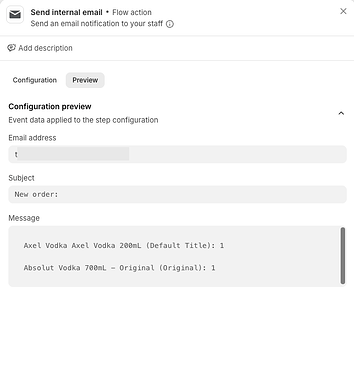
Example Output:
The code will produce an output similar to this (as shown in the original forum):
Combining Properties Inside a Single Loop
As tim_1 pointed out, you might need to combine properties inside a single loop. This can be useful for formatting the output or accessing related data. Experiment with moving different properties within the loop to achieve your desired email format.
Key Takeaways for Shopify Store Owners and Developers
- Shopify Flow's Flexibility: Shopify Flow allows for significant customization through Liquid code.
- Understanding the Data Structure: Familiarize yourself with the
orderobject and its properties, especiallylineItemsandvariant. - Testing is Crucial: Always test your workflows thoroughly to ensure they function as expected.
- Community Resources: The Shopify Community is a valuable resource for finding solutions and inspiration.
By utilizing Liquid code within Shopify Flow, you can effectively retrieve and display order line item variant details in your internal email notifications, streamlining your order processing and improving communication within your team.