Elevate Your E-commerce: AI-Powered Product Photo Critique and Optimization for Shopify Stores
Unlocking the Power of Visuals: AI-Driven Product Photo Enhancement for Shopify
In the competitive world of e-commerce, high-quality product photos are crucial for attracting customers and driving sales. The Shopify Community forum thread, "Product photo critique + one-click 'studio look' cleanup/optimization," highlights the challenges merchants face in achieving professional-looking images and explores an AI-powered solution called Shotwise.
The Importance of Product Photo Quality
The discussion underscores the significance of compelling visuals in online retail. As @jameswalker points out, a tool that offers practical suggestions before diving into editing is valuable. The focus on "real product photos and not heavy effects" is key, as authenticity resonates with customers. The ability to save time and avoid costly reshoots, especially for smaller teams, is a major advantage.
Introducing Shotwise: AI-Powered Photo Critique and Optimization
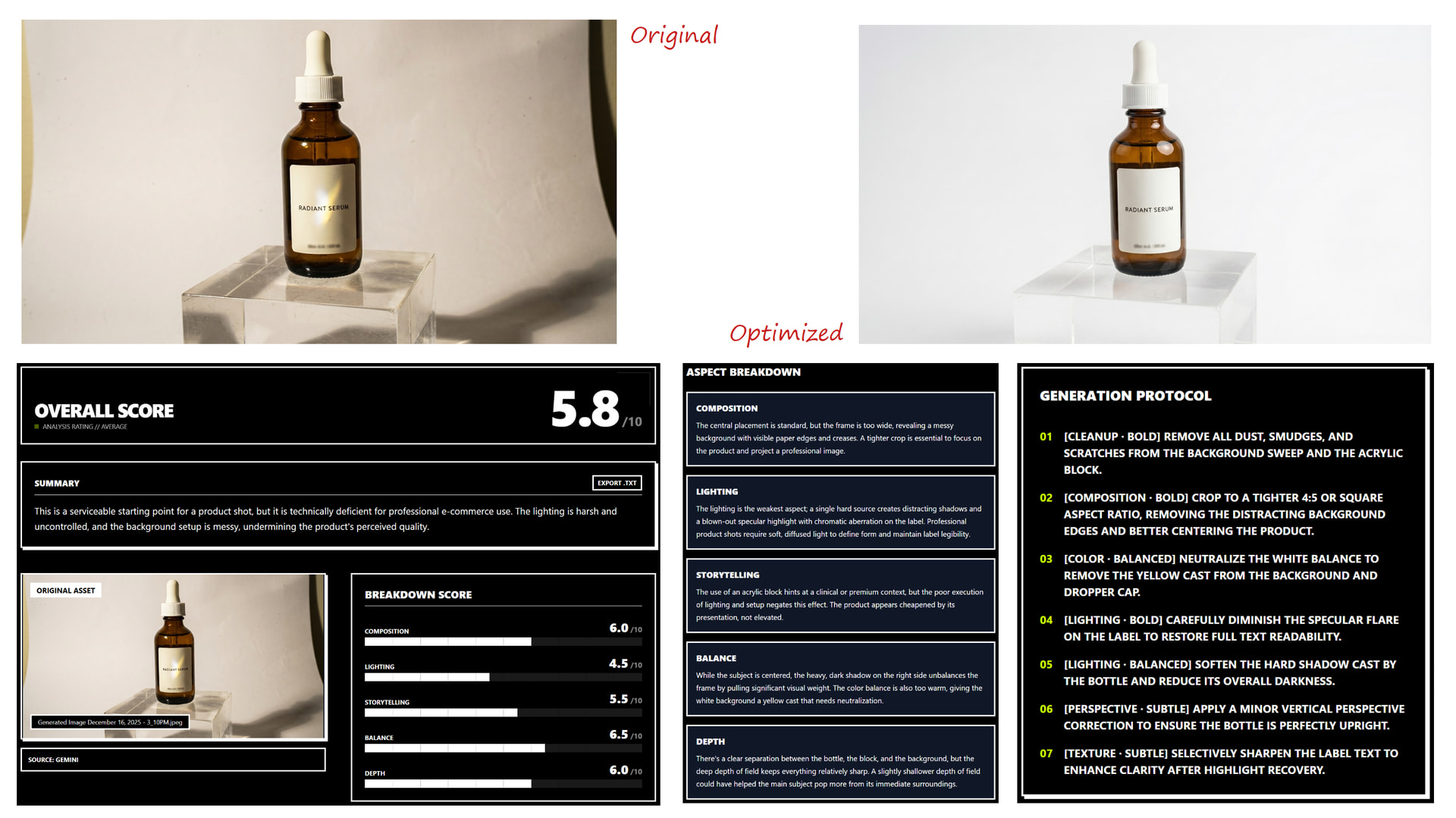
Shotwise, introduced by its creator, aims to bridge the gap between amateur product photos and professional studio shots. The tool offers AI-driven critique on various aspects of an image, including composition, lighting, storytelling, balance, and depth. Its core focus is on delivering e-commerce-ready cleanup and "studio look" corrections.
The key selling point of Shotwise is its ability to improve product shots quickly without requiring reshoots or extensive setup modifications. This is achieved through a workflow that involves uploading a photo, receiving a structured critique with scores and specific edit suggestions, and generating a corrected version with a single click. The tool prioritizes realistic product representation, avoiding heavy stylization or warping.
Here's an example of the tool in action:
Key Takeaways and Actionable Steps
For Shopify store owners and developers, the Shotwise discussion highlights several key takeaways:
- Prioritize Product Photo Quality: Invest time and resources in creating visually appealing product photos.
- Consider AI-Powered Solutions: Explore AI-driven tools like Shotwise to streamline the photo editing and optimization process.
- Focus on Authenticity: Choose tools and techniques that enhance, not distort, the true appearance of your products.
- Test and Iterate: Continuously evaluate the impact of your product photos on sales and engagement, and refine your approach accordingly.
How to Improve Your Product Photos with AI: A Step-by-Step Guide (Using Shotwise as an Example)
While the thread doesn't provide specific step-by-step instructions in the traditional sense, we can infer a general workflow based on the Shotwise description:
- Sign Up for Shotwise (or a similar AI photo editing tool): Visit the Shotwise website (https://www.shotwiseai.com/) and create an account.
- Upload Your Product Photo: Select the product photo you want to improve and upload it to the Shotwise platform.
- Receive AI-Powered Critique: Allow the AI to analyze your photo and generate a detailed critique, including scores and specific edit suggestions (e.g., adjust brightness, improve contrast, correct composition).
- Apply One-Click Optimization: Use the one-click optimization feature to automatically apply the recommended edits and generate an improved version of your photo.
- Review and Refine (Optional): If desired, manually adjust the AI-generated edits to fine-tune the final result.
- Upload to Your Shopify Store: Download the optimized photo and upload it to your Shopify product listing.
Conclusion
The Shopify Community discussion surrounding Shotwise emphasizes the growing importance of AI in e-commerce. By leveraging AI-powered tools for product photo critique and optimization, Shopify store owners can enhance their visual merchandising, attract more customers, and ultimately drive sales growth. Remember to prioritize authenticity and continuously test and refine your approach to achieve the best possible results.